Abisnabidam Abisnabidam

Start11 v2 Release (2.74) Feedback

Start11 v2 Release (2.74) Feedback

With the Start11 v2.74 release today, we are creating this thread so that users can report any observed issues.  

Obtaining the product

Object Desktop members can get the release from within Object Desktop Manager 

Individual purchases (as well as Object Desktop Members) can also be obtained from your account page: https://store.stardock.com/myaccount/products

For guest check-out purchase (no account), from this link: http://www.stardock.com/support/productkeyretrieval

Reporting an issue

Please include the following for anything found:

  • Exact Windows version \ build (winver.exe)

  • Detailed steps to recreate the issue seen

  • Screenshots and videos are very helpful.  Videos can be uploaded to a cloud drive service (GoogleDrive, DropBox, OneDrive, YouTube), with a shared link included in your post.  Images can be copied and pasted directly into a post.

  • If there are specific apps that the app does not work (well) with, please note what apps and their exact versions.  If any app is not common, a link to a trial version would be appreciated.

Thank you for your interest and any time you put into making Start11v2 a better product.

2,037 views 41 replies | Pinned
Reply #26 Top

Two updates on my experience, Basj;

The failure to recognise the cursor's interaction with the start button applies to the stylus (wacom drivers) but does not apply to the cursor when driven by the trackpad.

The failure of right-clicking the taskbar to provide the Start11-provided context menu only applies on the first right click; repeating it, the correct context menu shows.

Reply #27 Top

yeah i just took a screenshot of this website and it flipped completely, i did have the old setup.exe that was still working so i downgraded to it and the issue is completely gone. the start11 version 2.51 is just completely void of this problem but the task bar is really buggy. tldr the weird stretch is gone and images do not automatically go upside down. i dont know if the metadata for images is the issue unless this version cant understand it and makes it work better lol.

Reply #29 Top
Quoting rick160, reply 3997059

Thanks Basj,

The problem persists across full reboots, so I'm going to say that restarting Explorer doesn't resolve it.

I have partially resolved it for my usage scenario (by getting rig of the taskbar autohide – so at least it's not painting in the default button and messing with the height), but that still results in the clickable area to launch the start menu being a thin sliver to the left of the start menu.

End of rick160's quote

I am not talking about reboot, I am asking about just restarting Explorer.exe after the issue appear. From what I understand, the issue appear when you change orientation from vertical to portrait (table mode) yes? So, when the issue appear, and you restart explorer.exe does the issue still appear?

Quoting rick160, reply 3997064

Two updates on my experience, Basj;

The failure to recognise the cursor's interaction with the start button applies to the stylus (wacom drivers) but does not apply to the cursor when driven by the trackpad.

The failure of right-clicking the taskbar to provide the Start11-provided context menu only applies on the first right click; repeating it, the correct context menu shows.

End of rick160's quote

When the issue appear, do the restart Explorer.exe while you in tablet mode, does it than recognize the stylus click?

I understand this will not resolved your issue, just something I wanted to test out, and pass it to Support.

Thank you,

Basj,

Stardock Community  Assistant

Reply #30 Top
Quoting pelaird, reply 3997062

The upside down image is caused by the data in the metadata of the image which can be fixed in an image editor, but the stretching I don't have answer for. I have a lot of trouble making images fit the way I want. There needs to be a way to turn off the algorithm that controls the image size. I have marks on my monitor bezel for the four corners of the Start menu and will do screen capture the exact size of the Start menu, but it never displays correctly, with either Stretch to show entire texture on or off. It would be nice to get an explanation of how this works. (hint, hint)

End of pelaird's quote

btw i totally agree with this, it needs to allow custom constraints otherwise it gets really frustrating.

Reply #31 Top
Quoting basj, reply 3997068

I am not talking about reboot, I am asking about just restarting Explorer.exe after the issue appear. From what I understand, the issue appear when you change orientation from vertical to portrait (table mode) yes? So, when the issue appear, and you restart explorer.exe does the issue still appear?


When the issue appear, do the restart Explorer.exe while you in tablet mode, does it than recognize the stylus click?

I understand this will not resolved your issue, just something I wanted to test out, and pass it to Support.

Thank you,

Basj,

Stardock Community  Assistant

End of basj's quote

Ah, sorry.

In my attempts to recreate the issue, I couldn't remember the original setting that resulted in the double start button, so haven't been able to recreate the full originally-observed observed behaviour. As such, the only part of the behaviour that I can recreate is the failure of the start button to respond to the stylus' presence; this is the case in both tablet and normal laptop modes. It does, however, respond to the touchpad-driven cursor normally.

The situation appears to be more convoluted that I thought. The main problem is the interaction between the stylus and the start button; an interaction that does not occur when using the touchpad. Also, that problem is not restricted to tablet mode. While this might seem to be a stylus driver problem, it only effects the start button, not other elements. I also deactivated Start 11 to test that; the start button works normally in this instance.

What makes it a little more convoluted is that when I revert to the default Windows start button icon within Start 11, the start menu gets seriously messed up, sometimes launching both the Start 11 one, sometimes the Windows one, switching between them on a subsequent click, or both launching together (Start 11 underneath).

I know this is confusing. It took me a lot of attempts to make it this clear.

Reply #32 Top
Quoting rick160, reply 3997076

Ah, sorry.

In my attempts to recreate the issue, I couldn't remember the original setting that resulted in the double start button, so haven't been able to recreate the full originally-observed observed behaviour. As such, the only part of the behaviour that I can recreate is the failure of the start button to respond to the stylus' presence; this is the case in both tablet and normal laptop modes. It does, however, respond to the touchpad-driven cursor normally.

The situation appears to be more convoluted that I thought. The main problem is the interaction between the stylus and the start button; an interaction that does not occur when using the touchpad. Also, that problem is not restricted to tablet mode. While this might seem to be a stylus driver problem, it only effects the start button, not other elements. I also deactivated Start 11 to test that; the start button works normally in this instance.

What makes it a little more convoluted is that when I revert to the default Windows start button icon within Start 11, the start menu gets seriously messed up, sometimes launching both the Start 11 one, sometimes the Windows one, switching between them on a subsequent click, or both launching together (Start 11 underneath).

I know this is confusing. It took me a lot of attempts to make it this clear.

End of rick160's quote

Perhaps, making and posting a video on it might help explaining it easier.

Thank you,

Basj,

Stardock Community  Assistant


Reply #34 Top
There is a new mod in Windhawk that is called Taskbar Dock Animation and renders a very beautiful Mac like taskbar when you hover over the icons. Unfortunately it does not work with the Start11 Enhanced taskbar. Could you imagine developing something nice like that in the future? I mean if an independent programmer can create something like this, for sure Stardock could make it? 
Also any news with the bug I had posted sometime ago with not being able to right-click on battery/Power and Sleep settings when the taskbar is dragged and has become higher than 3-4 lines?
Reply #35 Top

The Taskbar Combine Buttons settings aren't available when I have Vertical Taskbar set. I worked around it by changing to Bottom position, then choosing Combine Buttons, then changing back to Vertical Taskbar.

Reply #36 Top

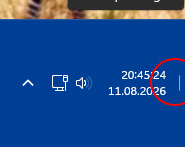
I hope the problem on multi-line taskbars can be fixed: The "show desktop button" ist only a tiny line in the middle of the task bar. Clicking on the lower right corner does not activate it. It is very hard to click at and not functional anymore. 


Reply #37 Top

I am still having the same issue with right clicking on the taskbar sometimes (frequently) causes the context menu to freeze. If I'm trying to open task manager for example, it will freeze with that selection highlighted in the context menu and sometimes it's up to 15 or 20 seconds until task manager will open.  While the context menu is hung, you can still use the mouse and the Windows key to access the menus. This seems even more frequent with the latest beta ( tried it out to see if it resolved the issue). I've completely uninstalled the program several times. Even used Revo uninstaller to hunt down every remnant. Left it uninstalled for weeks through Windows updates. This is another attempt with a new install of the program and it has the same issue with the hanging of the taskbar. This never ever occurs when the program is not installed. It will occur if Start11 service is running even if enhancing the desktop or the task bar is disabled. Only uninstalling the program will stop the issues with the taskbar. This issue has only started in the last several months. For years the program ran fine.


Reply #38 Top
Quoting HeavyHemi, reply 4146044

I am still having the same issue with right clicking on the taskbar sometimes (frequently) causes the context menu to freeze. If I'm trying to open task manager for example, it will freeze with that selection highlighted in the context menu and sometimes it's up to 15 or 20 seconds until task manager will open.  While the context menu is hung, you can still use the mouse and the Windows key to access the menus. This seems even more frequent with the latest beta ( tried it out to see if it resolved the issue). I've completely uninstalled the program several times. Even used Revo uninstaller to hunt down every remnant. Left it uninstalled for weeks through Windows updates. This is another attempt with a new install of the program and it has the same issue with the hanging of the taskbar. This never ever occurs when the program is not installed. It will occur if Start11 service is running even if enhancing the desktop or the task bar is disabled. Only uninstalling the program will stop the issues with the taskbar. This issue has only started in the last several months. For years the program ran fine.

End of HeavyHemi's quote

Hello,

Sorry to hear you are having issues. It seem something is conflicting with Start11. Would like to suggest trying Clean Boot, refer here for steps: https://support.stardock.com/space/SHC/1334935592/Start11+Clean+Boot. Do know that Clean Boot need to be done with care. Try it and report back. Also, it is best to create your own thread, since your issue is probably unique to your system, posting in general thread will get things mix up fast.

Thank you,

Basj,

Stardock Community  Assistant.


Reply #39 Top
Quoting basj, reply 4146080
Quoting HeavyHemi, reply 4146044

I am still having the same issue with right clicking on the taskbar sometimes (frequently) causes the context menu to freeze. If I'm trying to open task manager for example, it will freeze with that selection highlighted in the context menu and sometimes it's up to 15 or 20 seconds until task manager will open.  While the context menu is hung, you can still use the mouse and the Windows key to access the menus. This seems even more frequent with the latest beta ( tried it out to see if it resolved the issue). I've completely uninstalled the program several times. Even used Revo uninstaller to hunt down every remnant. Left it uninstalled for weeks through Windows updates. This is another attempt with a new install of the program and it has the same issue with the hanging of the taskbar. This never ever occurs when the program is not installed. It will occur if Start11 service is running even if enhancing the desktop or the task bar is disabled. Only uninstalling the program will stop the issues with the taskbar. This issue has only started in the last several months. For years the program ran fine.

End of HeavyHemi's quote

Hello,

Sorry to hear you are having issues. It seem something is conflicting with Start11. Would like to suggest trying Clean Boot, refer here for steps: https://support.stardock.com/space/SHC/1334935592/Start11+Clean+Boot. Do know that Clean Boot need to be done with care. Try it and report back. Also, it is best to create your own thread, since your issue is probably unique to your system, posting in general thread will get things mix up fast.

Thank you,

Basj,

Stardock Community  Assistant.

End of basj's quote

This seems similar to the problem I reported earlier (reply #16) but with no reply from Stardock.  Freezing of up to 15-20 seconds while engaging with the taskbar - in my case this happens with the taskbar on my third monitor, whereas I'm not sure which monitor the problem is with for the post from HeavyHemi (on all monitors or only on some?).  

I don't understand why the advice from Basj is to "create your own thread" when I thought this thread was for problems with this version?  

Reply #40 Top
Quoting bringbackwin11toptaskbar, reply 4146118

This seems similar to the problem I reported earlier (reply #16) but with no reply from Stardock.  Freezing of up to 15-20 seconds while engaging with the taskbar - in my case this happens with the taskbar on my third monitor, whereas I'm not sure which monitor the problem is with for the post from HeavyHemi (on all monitors or only on some?).  

I don't understand why the advice from Basj is to "create your own thread" when I thought this thread was for problems with this version?

End of bringbackwin11toptaskbar's quote

Hello,

I understand the confusion. The reason we encourage users with more complex or system‑specific issues to open their own thread is so the team—and other community members—can focus on that particular case without it getting buried inside a general feedback thread.

General version threads often collect many different reports, and not all of them are caused by the same version of Start11. In many cases, the root cause is something unique to the individual system, so having a dedicated thread makes it much easier for the team to track, investigate, and respond properly.

We truly appreciate you sharing your experience, and creating a separate thread helps ensure it receives the attention it deserves.

Thank you.

Basj,

Stardock Community Assistant


Reply #41 Top

Hello all,

The Start11 v2 beta has now been updated to version 2.8.0.2.  For details and changes on the beta version, please visit:

https://forums.stardock.com/542304/start11-v2-beta-2-8-feedback-thread/page/1

Thank you as always for your feedback and support.

Best regards,

Adam McGuinness
Stardock Support Specialist