Start11 v2 Release (2.74) Feedback
With the Start11 v2.74 release today, we are creating this thread so that users can report any observed issues.
Thank you for your interest and any time you put into making Start11v2 a better product.
With the Start11 v2.74 release today, we are creating this thread so that users can report any observed issues.
Thank you for your interest and any time you put into making Start11v2 a better product.
Known issues
While we appreciate all feedback, please remember that we offer no official support for beta \ preview \ developer channel versions of Windows. If you report issues while in any of those early release channels, you should not expect them to be addressed unless it still exists in a retail version of Windows.
***Reserved***
Were there any additional small changes since the Beta?
Windows 10 Style, Display 125%
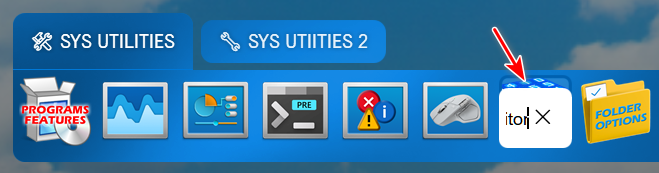
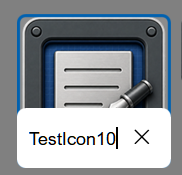
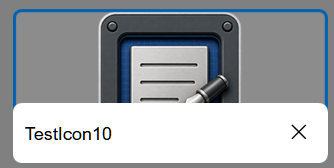
The Rename bubble is very small and does not expand to show the full name. This may be by design, but it makes it hard to use the Rename feature. This appears to be the case with all available styles.
EDIT: Evidently the Rename bubble is limited to the size of the icon. On medium or larger the bubble is useable.
Small Size

Medium Size Wide Size

Windows 11 Pro - 26200.8894; Start11v2 - 2.7.4.0
Hi Pelaird, and thank you for posting.
Were there any additional small changes since the Beta?
Not in this release. We wanted to get this into the full public version, primarily because users were consistently reporting positively to the Beta. Especially for those on newer versions of Windows.
Windows 10 Style, Display 125%
The Rename bubble is very small and does not expand to show the full name. This may be by design, but it makes it hard to use the Rename feature. This appears to be the case with all available styles.d
EDIT: Evidently the Rename bubble is limited to the size of the icon. On medium or larger the bubble is useable.
Small Size
Medium Size Wide Size
Windows 11 Pro - 26200.8894; Start11v2 - 2.7.4.0
I can see this occurring for small icons in the Win10 style, with 100% (Recommended) scale. Will have it logged.
Thanks again and best regards,
Adam McGuinness
Stardock Support Specialist
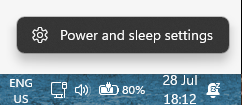
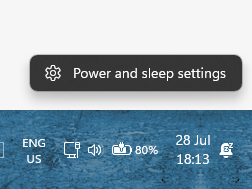
Back to the issue of not being able to click on the Power and Sleep settings:
Like this :

I can click on it
Like this if you click on it nothing happens, :

Just drag the taskbar higher, the option to click also moves higher but not possible to click it.
Hi Nikosyan, and thank you for clarifying.
Back to the issue of not being able to click on the Power and Sleep settings:
Like this :
I can click on it
Like this if you click on it nothing happens, :
Just drag the taskbar higher, the option to click also moves higher but not possible to click it.
I've reproduced the same and have it logged.
Thanks again and best regards,
Adam McGuinness
Stardock Support Specialist
Date
7/10/2026
Version
UI: 2.74
File Version: 2.7.4.0
Changes
Fixes an issue with pinning to the taskbar for pinned menus etc on newer versions of Windows
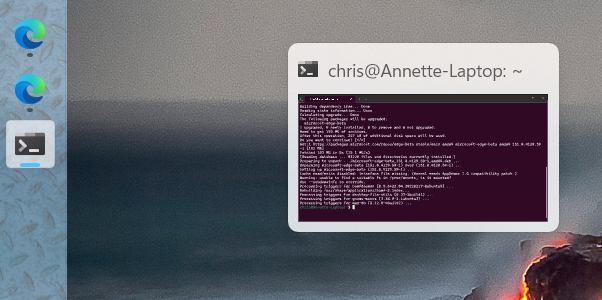
Addresses hover-over preview issue with some monitor and taskbar combinations (in version 2.73).
Hover-over issue for me when using left-side vertical taskbar (see screenshot).

Preview is right-shifted considerably regardless of whether it's a running task, taskbar icon or pinned icon.
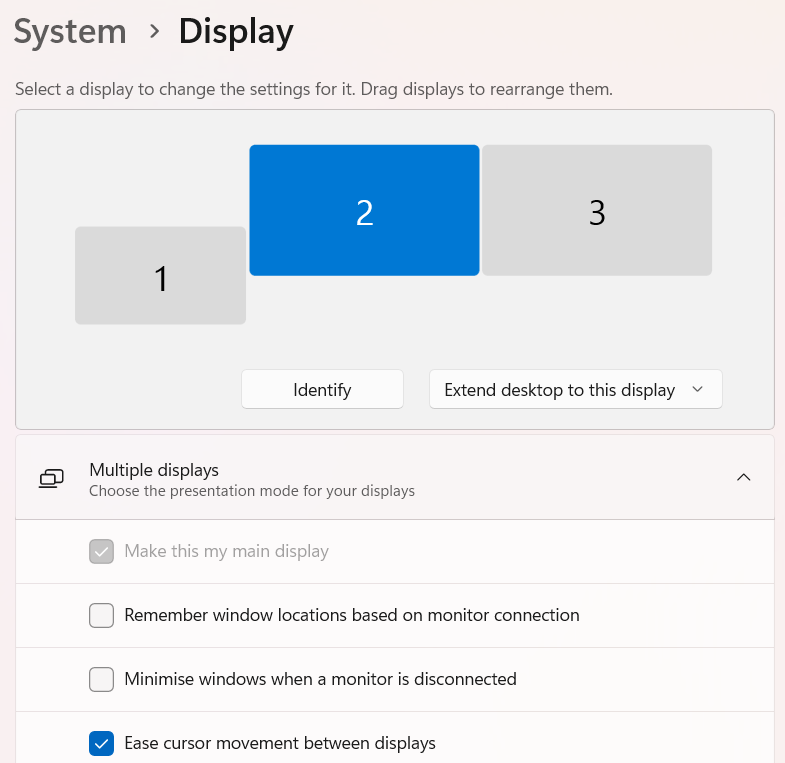
Configuration is per below, screen 2 is the primary and contains task bar.

Anyone else reported problems with their windows key not working after this update? I'm on windows 11, 26200.8973. I actually noticed it immediately after installing the update, before I rebooted. I've completely powered off my laptop and powered it back on and it still isn't working. ctrl+esc doesn't work either. I checked and it didn't get put into game mode or whatever it is called that disables the key.
I've tested with both my laptop keyboard and my logitech wireless keyboard.
Clicking the start button brings up the Start11 menu correctly though, so I've just been working around it.
If I go to Start11 -> Start Menu and turn it off, I immediately get my windows key back.
Anyone else reported problems with their windows key not working after this update? I'm on windows 11, 26200.8973. I actually noticed it immediately after installing the update, before I rebooted. I've completely powered off my laptop and powered it back on and it still isn't working. ctrl+esc doesn't work either. I checked and it didn't get put into game mode or whatever it is called that disables the key.
I've tested with both my laptop keyboard and my logitech wireless keyboard.
Clicking the start button brings up the Start11 menu correctly though, so I've just been working around it.
If I go to Start11 -> Start Menu and turn it off, I immediately get my windows key back.
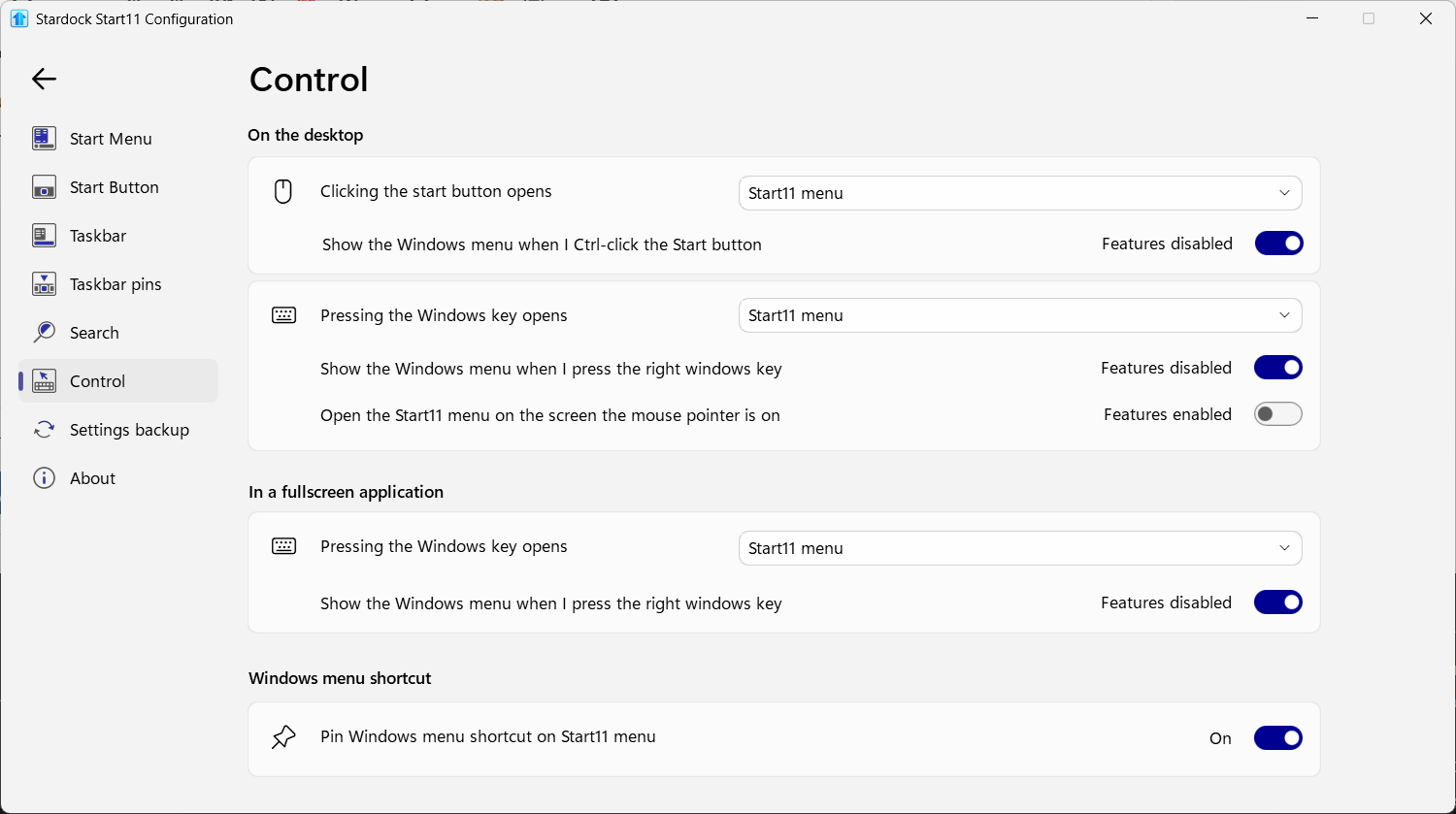
Just curious. Have you checked the Start11 settings in the Control Section of the Config app? There is setting for disabling the Win key when in full screen.
This is what it is set to. Not sure what "features disabled" means in this case, but i don't have a right windows key anyway.

And now it is working again. Apparently I just had to go in and change all of the settings and turn everything off, then back on again. I swear it wasn't working at one point,
Evidently, when the button is turned on the feature is enabled, and when it is off the feature is disabled. Crazy, right?
And now it is working again. Apparently I just had to go in and change all of the settings and turn everything off, then back on again. I swear it wasn't working at one point,
Glad you got it to work correctly. Sometimes, just toggling a setting makes it work.
I have been having the issue of after right clicking on the taskbar, the context menu freezes and is inactive. Typically, but not always, Start11 is highlighted in the context menu. Some times hitting the Windows key will clear it, other times it is just waiting it out. Typically no longer that 5 to 10 seconds. This has persisted through multiple versions of Start 11 and Windows for the last several months. I am on the latest release version of Windows 25H2. If I uninstall Start11 this is never occurs. Disabling Start11 does not prevent the issue. Only uninstalling the program.
Since upgrading to start11 v 2.74:
The taskbar on monitor 3 becomes occasionally unresponsive with a lag of up to 10-15 seconds, after which there is a burst of executing all the operations I did with the taskbar while it appeared to be unresponsive.
When the taskbar freezes, if I right-click on a taskbar item on Monitor 3, its context menu appears on monitor 2.
If there is not a freeze on monitor 3, if I right-click on a taskbar item on monitor 3 the context menu appears with rapid flickering for up to 10 seconds then it eventually stops flickering.
These issues only happen with the taskbar on monitor 3. I have not experienced this issue on monitor 1 or 2. Monitor 3 is identified as #3 by windows. It is physically connected to monitor 2 (which i set to be the primary monitor) and monitor 2 is physically connected to monitor 1 of my laptop.
When this happens the desktop on monitor 3 remains responsive as usual - so the issue is with the taskbar.
After doing the upgrade, I rebooted (as instructed) and i did not apply any other updates and did not adjust any computer settings. I have used start11 for many years but my upgrade to v2.74 skipped prior updates so I'm not sure if this issue is something particular to v2.74 or a prior version.
It is difficult to reproduce the issue 100% of the time. Sometimes it happens when I click on another taskbar item on monitor 3 when I am already engaging with an app that has the focus on monitor 3. Sometimes it happens when I engage with the taskbar on monitor 3 after I’ve been engaging with an app on monitor 1 or 2. Sometimes it happens when I simply click once on another item on the monitor 3 taskbar to have its maximized window appear on top, other times it can happen when that window was previously maximized.
Seems to be worse when the cpu fan is more active indicating other processing taking place on the computer, so possibly this relates to start11’s processing is being demoted in priority by windows 11. (Since eventually it catches up).
Thanks in advance to others who might identify also having this same problem and to the start11 team for figuring out a solution.
so i'm finally getting around to following up with this. I have my windows key back, but getting it back caused taskbar icons to be always separate, never combined. This was just weird because it was set right in windows and I didn't realize that there was a separate Start11 taskbar setting for it. Once I found it, I got everything back.
But I while clicking and searching, I had two suggestions:
If there's a setting in Start11 and a setting in Windows, like whether or not to combine the taskbar buttons, it would be great if they were synced. Changing a setting in the Windows Settings would change the setting in Start 11 and the reverse.
I couldn't click on an empty place in the Start 11 scrollbar and move up or down. Normally clicking the blank space, the track, in a scrollbar does a page up or page down, depending on whether you click above or below the thumb.
Hi SD devs,
Had some issues with the taskbar replacement in Start11 for a few months; couldn't pin down a specific cause, so I've reverted to the Windows default for now.
Pinned packaged apps will not launch from the Start11 taskbar. Left-clicking a pin that activates via AppUserModelID, such as Notepad, Outlook (new), or Claude Desktop, opens a file manager window at This PC instead of launching the app. Ordinary .lnk pins such as Chrome, VS Code, Word and Steam all launch normally, so the fault looks confined to the AUMID activation path.
Environment: Start11 2.7.4.0, Windows 11 Pro N 25H2 build 26200.8875, Fences 6.5.2.7 also installed.
Already ruled out: the app registrations are healthy, evidenced by Get-StartApps resolving every affected AUMID and the same apps launching fine from the Start menu and from scripted shell activation across three trials each. It is also not the half-applied-update stale-hook problem, as PendingFileRenameOperations is clear, and the Stardock DLLs loaded in explorer.exe match the versions on disk following a reboot. Repinning does not help either.
I do run Directory Opus with Explorer Replacement enabled, which is why the window that appears is an Opus lister rather than an Explorer one. I tested that specifically, and it is incidental. On a stock machine, the same fault would likely appear as a plain Explorer window under This PC.
TaskbarAppIDCache contains several stale entries, including Claude.lnk mapped to a Chrome web app ID rather than the current Claude Desktop AUMID, and TaskbarPinLogic contains a single entry for Outlook (new). Two of the three affected apps.
Disabling the Start11 taskbar restores normal launching, and that is what I am running for now, though I would rather keep using it. The full write-up, including exact registry paths, versions, and test results, is attached.
Thanks, guys, love the software suite btw.
Welcome Guest! Please take the time to register with us.