DeskScapes 2026 (26.0.1.1) Release Feedback
Thank you for your interest and any time you put into making DeskScapes 2026 a better product.
Known issues
While we appreciate all feedback, please remember that we offer no official support for beta \ preview \ developer channel versions of Windows. If you report issues while in any of those early release channels, you should not expect them to be addressed unless it still exists in a retail version of Windows.
***Reserved***
Horribly slow to load content. I just installed this on a brand new Alienware Aurora 16 running Windows 11 Pro. Not sure why Deskscapes seems to always have a bad connection to Wincustomize. My network settings are optimal since websites and everything else is snappy to load.
Hello,
Sorry to hear you are having issues. Need to know, how long did you actually need to download a file and how large the file size. I just checked on my system and I just need less than a minute to download a 4K animated wallpaper.
Thank you,
Basj,
Stardock Community Assistant.
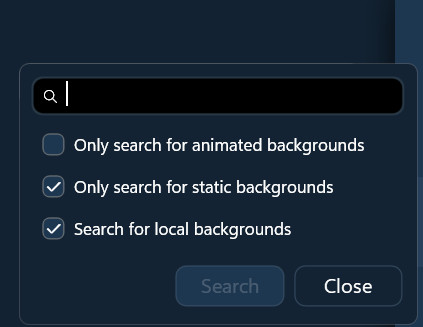
Searching Installed background with "Only search for static backgrounds" and "Search for local backgrounds" crashes DeskScapes 26.

My system is Windows 11 Pro - 26200.8973; and DeskScapes 26.0.1.1
Searching Installed background with "Only search for static backgrounds" and "Search for local backgrounds" crashes DeskScapes 26.
My system is Windows 11 Pro - 26200.8973; and DeskScapes 26.0.1.1
Thanks for the report. Seems there's something unusual when "Search" is clicked, will get looked into.
As it is now, if you press Enter on your keyboard instead, does it function for you normally?
Best regards,
Adam McGuinness
Stardock Support Specialist
As it is now, if you press Enter on your keyboard instead, does it function for you normally?
Yes, it works as expected if you use the Enter key.
Welcome Guest! Please take the time to register with us.